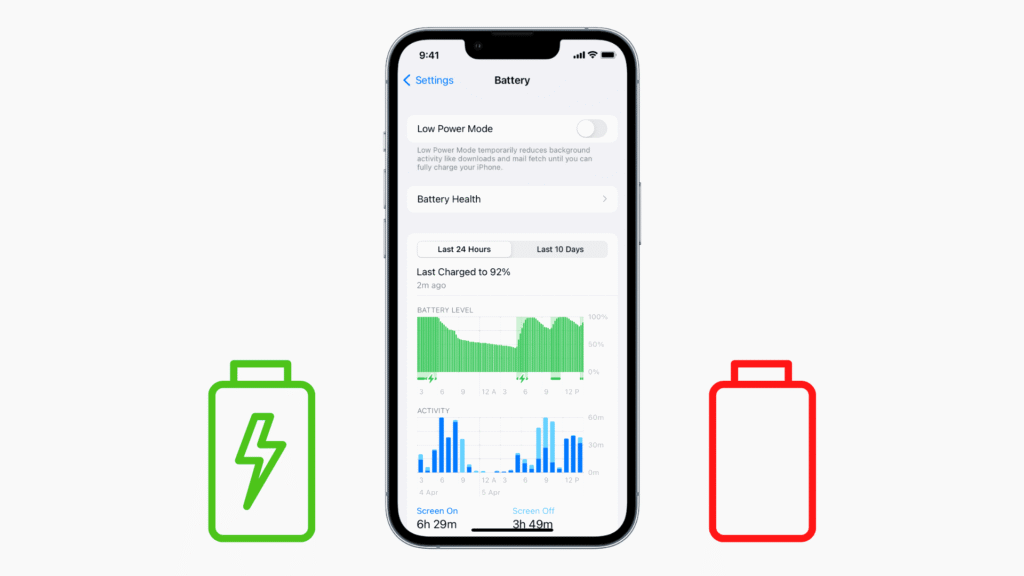
The batteries of iPhones don’t have the best reputation, especially the older models. I’ve been using an iPhone 14 Pro for almost 2 years now, and as a power user, I ALWAYS have to carry a power bank with me. After being frustrated with the battery life of my device, I finally decided to do some research, found actionable tips, used them myself, and now I’m sharing the wisdom with everyone else.
In this blog, I’ll tell you about basic things you can do to maintain and improve your iPhone battery health.
How to Check Battery Health?
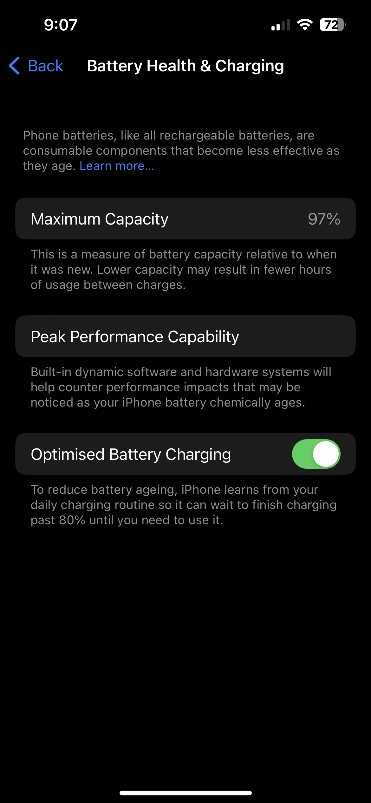
Before we jump into actionable items, find out the battery health of your device so you have a clear idea of where you started and if the tips I’ve mentioned are working or not.
Here’s how to check battery health on your iPhone:
- Go to Settings on your device
- On the search bar at the top, search “Battery Health & Charging” and click on it.
- Once the new page opens, you’ll be able to see the current battery health of your iPhone.
Example –
10 Tips to Maintain Battery Health
1. Get Rid of Unnecessary Features
There are features on your iPhone that consume your battery without you knowing. To maximize your power backup during after every charge, turn off these unnecessary features.
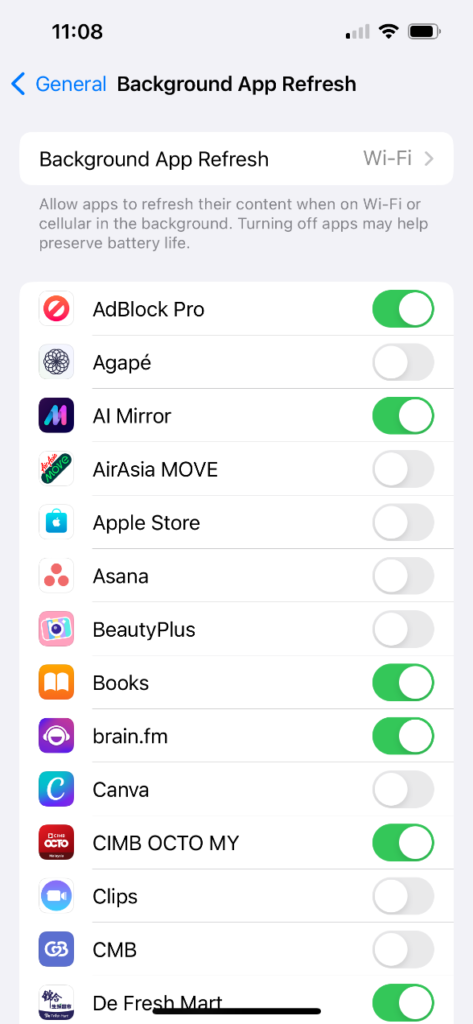
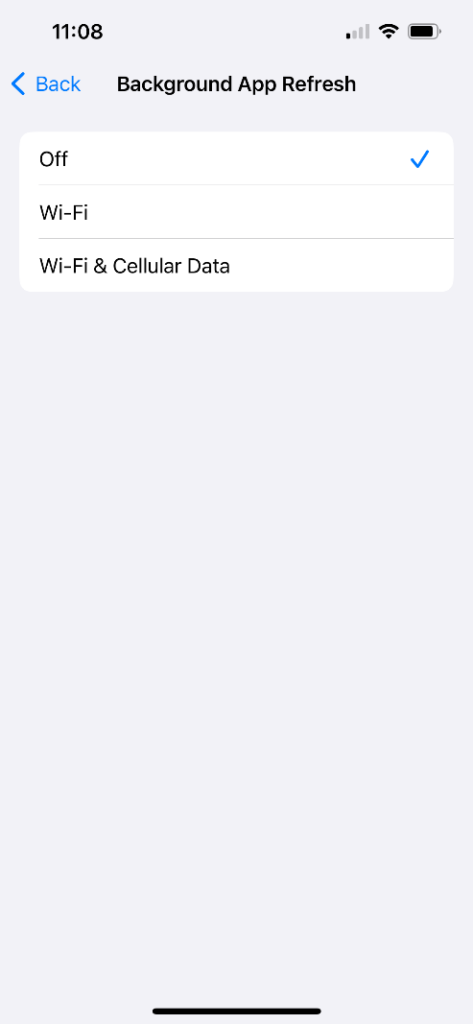
One of the biggest culprit of this is a feature called “Background App Refresh”.
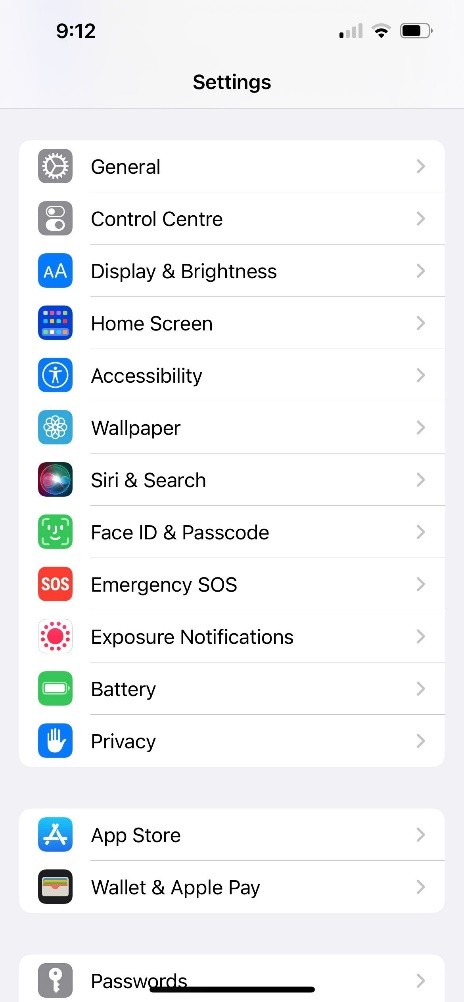
To turn it off, follow these steps – Settings > General > Background App Refresh > Off.
Another feature you can turn off to improve battery life is “Always-on Display”. Always-on Display is only available on iPhone 14 Pro & above models. If you’re using an older model, you don’t have to worry about this feature.
You can also turn on “Automatic Brightness” so your iPhone automatically reduces screen brightness according to lighting conditions around you.
To turn on Automatic Brightness – Settings > Accessibility > Display & Text Size > Toggle on Auto-Brightness.
2. Reduce Charge Cycles
Apple claims that after roughly 500 charges, your iPhone batteries are able to hold only 80% of their original battery capacity. You consume one charge cycle when you consume 100% of your device’s battery. Let’s say you charged your iPhone to 100%, you consumed 60% today, and 40% tomorrow, that would count as one charge cycle.
If you charge your iPhone once a day, you’ll start seeing the effect of reduced battery performance in 1.5 years.
If you can limit how much you use your iPhone in a day, you’ll be able to maintain the battery health for longer.
Also, keeping your device on charge even after the battery is full or using it till you run out of juice will put additional strain on your battery. Ideally, you should keep your battery between 40-80% to maintain battery health for longer.
3. Don’t Charge Overnight
I understand the convenience of plugging your phone before sleeping and waking up with the sweet sight of 100%. But, it’s doing you more harm than good. Let’s say you wake up at 6 AM, and your iPhone hits 100% at 4 AM, that means 2 hours of over-charging every single day.
Frequently overcharging your device hurts the battery as it pushes more power into the power cells than they require.
To prevent constant over-charging, iPhone has an Optimized Battery Charging feature that you can use to maintain battery health.
To turn it on – Settings > Battery > Battery Health & Charging > Toggle on “Optimized Battery Charging.”
Alternatively, you can just open the Settings app, search for Battery Health & Charging, and turn on the feature from there. It will save you a couple of seconds of confused scrolling (it has saved me countless seconds).
4. Don’t Let your iPhone Die
The lithium-ion battery on your iPhone has a limited life, which means sooner or later you’ll experience battery degradation.
You can’t prevent it completely, but you can slow it down. Some tips to consider:
- Don’t let your iPhone drain out completely.
- The battery cells go into a state of deep discharge when you let your phone die completely, degrading their life.
- Use “Low Power Mode” when you see your battery has dipped below 20%. It should keep your phone turned on till you find a socket.
5. Use Official Apple Chargers
I know official Apple charging bricks & cables are expensive, but they aren’t more expensive than a new battery. Using knock-offs or unofficial iPhone chargers can hurt your battery’s health as they’re not 100% compatible.
Use Apple’s MFi-certified accessories to maintain ideal battery health. Alternatively, you can also use officially approved lightning cables to charge your iPhone. They help keep your device protected against power surges, short circuits, and other issues that could hurt your battery health.
6. Get an iPhone Case
Speaking of accessories, investing in an iPhone case can also protect your battery health. While it seems like there’s no correlation, there’s a very simple explanation.
Phones fall and they get damaged. If you’re clumsy like me, you probably drop your iPhone at least 2-3 times a week. Repeated falls and impact can lead to internal component wear and tear, which in turn can impact your iPhone’s battery health.
If you can, get official Apple cases for your iPhone, otherwise get one from reputed brands. Make sure your case protects every corner of your iPhone from fall damage. Also, ensure the fabric is breathable so your iPhone doesn’t overheat.
7. Try to Prevent Extreme Temperature Changes
If you live in an extremely hot/cold place, then your iPhone can also get extremely hot or extremely cold. These temperatures can impact the lifespan of your battery.
If your iPhone is already running hot while using, let it cool down a bit before plugging in the charger.
Extreme low temperatures can lead to shorter battery life and over time it can cause irreversible damage. Extremely hot temperatures can cause damage to the device’s structure, leading to cracks and hurting battery performance. I’ve seen the glue of back panels come off on iPhones due to extremely hot temperatures, causing structural damage.
8. Don’t Charge & Use
This should go without saying but you shouldn’t be using your iPhone while it’s on charge. We’re all guilty of doing this and it can be hard to stop, but if you want to maintain the battery health for longer, stop.
Scrolling social media, playing games, or streaming videos while charging can cause your iPhone to overheat. And as I mentioned above, overheating your iPhone isn’t something you should be doing.
A little bit of planning in charging your device will help you in the long run.
9. Update to the Latest iOS Version
Unless and until you’re using an extremely older model (iPhone 7, 8), you should follow my advice on this. Keep your phone updated to the latest iOS versions. Every update comes with minor fixes that can improve device performance, feature updates, and software updates that can improve battery performance.
To check if you have an update pending – Settings > General > Software Update.
10. Charge iPhone to 50% Before Storing
If you’re anything like me and keep your old phones in storage when you get a new one, then this tip is gold. Charge your iPhone to 50% before storing it. This will ensure that your battery doesn’t depletes completely and you have a working iPhone the next time you take it out of storage.
If possible, set up a reminder for yourself to charge your iPhone to 50% every 6 months or so to maintain the battery.
Summing Up
So, that’s it. I applied a couple of these tips on my own device and I managed to stop my iPhone’s battery health dropping 1 point every month. It’s been 6 months since a battery health point has dropped on my device.
You won’t be able to maintain the same battery performance forever on your iPhone, but you can prolong it. If your battery health has dropped below 70 and has stopped working effectively, it may be time for a battery replacement.